> For the complete documentation index, see [llms.txt](https://docs.truedat.io/llms.txt). Markdown versions of documentation pages are available by appending `.md` to page URLs; this page is available as [Markdown](https://docs.truedat.io/v8.7/userguide/quality.md).

# Data Quality

The data quality module lets you define and implement quality rules. It integrates with the glossary of concepts at the definition level and with the data catalog at the implementation level.

## **Quality rules list** <a href="#id-1.4dataquality-checkqualityrules" id="id-1.4dataquality-checkqualityrules"></a>

When you access the quality module, you will see a list of quality rules. By default, this list shows the concept the quality rule is linked to, if any, and the data domain it belongs to. The columns in this view can be customized in each installation and can display any field from the quality rule template. See the [Template management](/v8.7/administration/templates.md) section for more information on templates.

You can filter the search by active or inactive rules, the domain the rule belongs to, the rule type used, and any template field defined as a fixed-value list.

## **Quality rules** <a href="#id-1.4dataquality-qualityrules" id="id-1.4dataquality-qualityrules"></a>

Quality rules define data quality from a business point of view. Here, you should explain why the rule is needed, how data quality affects the business, how the rule should be implemented, and any other information that is relevant from a business or functional perspective.

![](/files/UhjQMVyAKGxNanzoc59q)

A quality rule consists of standard fields common to all installations and fields that can be customized in each installation using the [template management](/v8.7/administration/templates.md) feature.

#### Standard Fields <a href="#id-1.4dataquality-mandatoryfields" id="id-1.4dataquality-mandatoryfields"></a>

* **Name**: Name that identifies the validation and that will be displayed when this rule appears in a list. The goal of this field is to help you quickly identify the validation.
* **Description**: Detailed description of how this validation should be performed and what result is expected. A rich text field is available for this description.
* **Domain**: Domain in which the rule will be stored. This is important to define who has permission to modify the rule, create implementations, and execute implementations.
* **Concept**: Optionally, you can select a concept to which the rule applies.
* **Active**: If the rule is active, the quality implementations associated with it will be executed.

#### Customized fields <a href="#id-1.4dataquality-configurablefields" id="id-1.4dataquality-configurablefields"></a>

In each installation, the required fields can be configured through [template management](/v8.7/administration/templates.md).

![](/files/HBxT0S9GY3qkkuKbFTFf)

#### Create new quality rule

Quality rules can be defined in three different ways:

* From a **business concept**. In this case, they provide a functional definition of the validations to be performed on the given business concept to ensure its validity. To define these rules, access a business concept and create the rule in the **Quality Rules** tab. The concept and domain will be assigned to the rule automatically.

![](/files/Z6maZThdeyeLat4PDEsN)

* From the **Data Quality module**. In this case, you need to enter the rule's domain and can optionally select a concept to link to the rule. In the main Data Quality Rules screen, click **New Quality Rule** to open the form and enter the rule information.

![](/files/cH01MmKuBtVZ1sC5KKK9)

* **Bulk upload** from a CSV file. You can also load the information from a CSV file. In the main Data Quality Rules screen, click the button on the right-hand side <img src="/files/4KeENbAxWoLyz8X9TNNu" alt="" data-size="line">. The file format depends on the template defined for your quality rules in your installation.

![](/files/Lx2Dd1AJDUVNMRHaSTp4)

## **Quality implementations** <a href="#id-1.4dataquality-qualityimplementations" id="id-1.4dataquality-qualityimplementations"></a>

Quality rules define validations at a functional level, and implementations define how those validations are applied to your data. The same rule can have several implementations because you may want to apply it to different data in your systems. Defining quality rules is not mandatory, so you can create quality implementations that are not linked to quality rules.

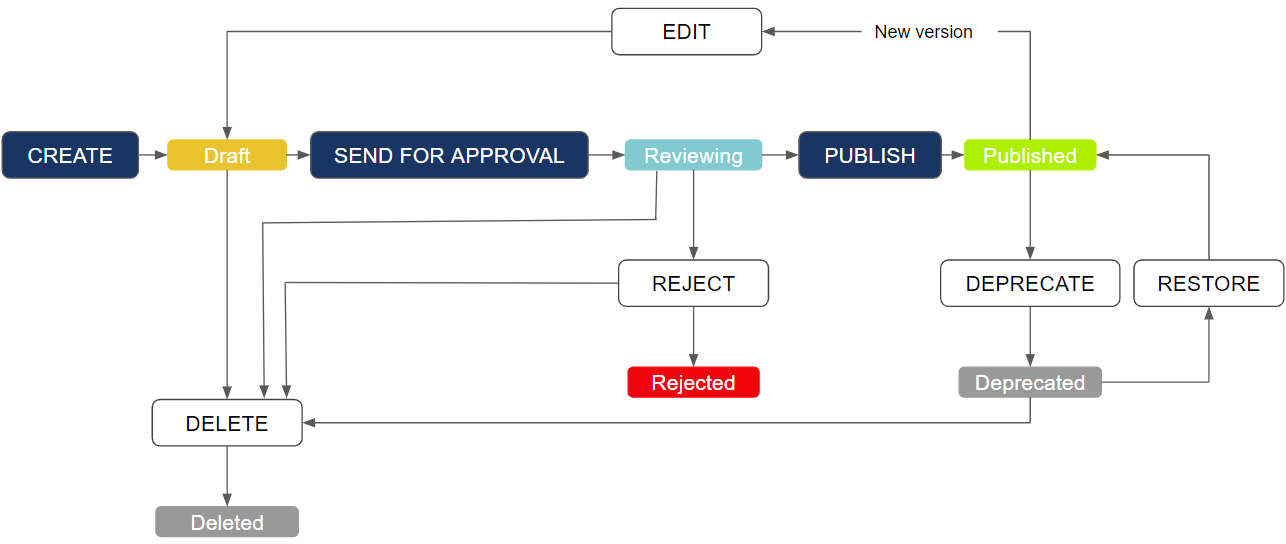
The creation of implementations can go through an approval process. Using the permissions linked to this functionality, certain roles can be given permission to create implementations in draft status and send them for approval, while a different role can be given permission to review implementations and approve or reject them.
<figure><img src="/files/ssTUdNsSqtPO44ORHWy7" alt=""><figcaption></figcaption></figure>

If you do not want to use this workflow, simply give the permissions to manage and review implementations to the quality roles defined in your installation.

You can access implementations in several ways:

* List all implementations through the sidebar menu, with data download, execution, search, and filter capabilities.
* View implementations related to a quality rule in a tab inside the quality rule.
* View implementations linked directly to a business concept in a tab inside the business concept.
* View implementations for a data asset in the data catalog.

Also, if your implementations go through an approval workflow, you can view the ones that are not yet published in the **Drafts** menu option under **Data Quality**.

![](/files/-MSSh8UnopaShUUJ-3pc)

### Quality Implementations setup <a href="#id-1.4dataquality-guidedformimplementations" id="id-1.4dataquality-guidedformimplementations"></a>

You can create a new implementation either linked to a quality rule or as a standalone implementation.

Depending on user permissions, two types of implementations can be registered: simple implementations created through a multi-step form, and raw or native implementations, which are usually more complex and are set up by entering SQL code. Depending on whether the implementation is linked to a rule, you will use either the **Quality Rules** menu option or the **Implementations** menu option.

**Option 1: Implementation linked to a rule**

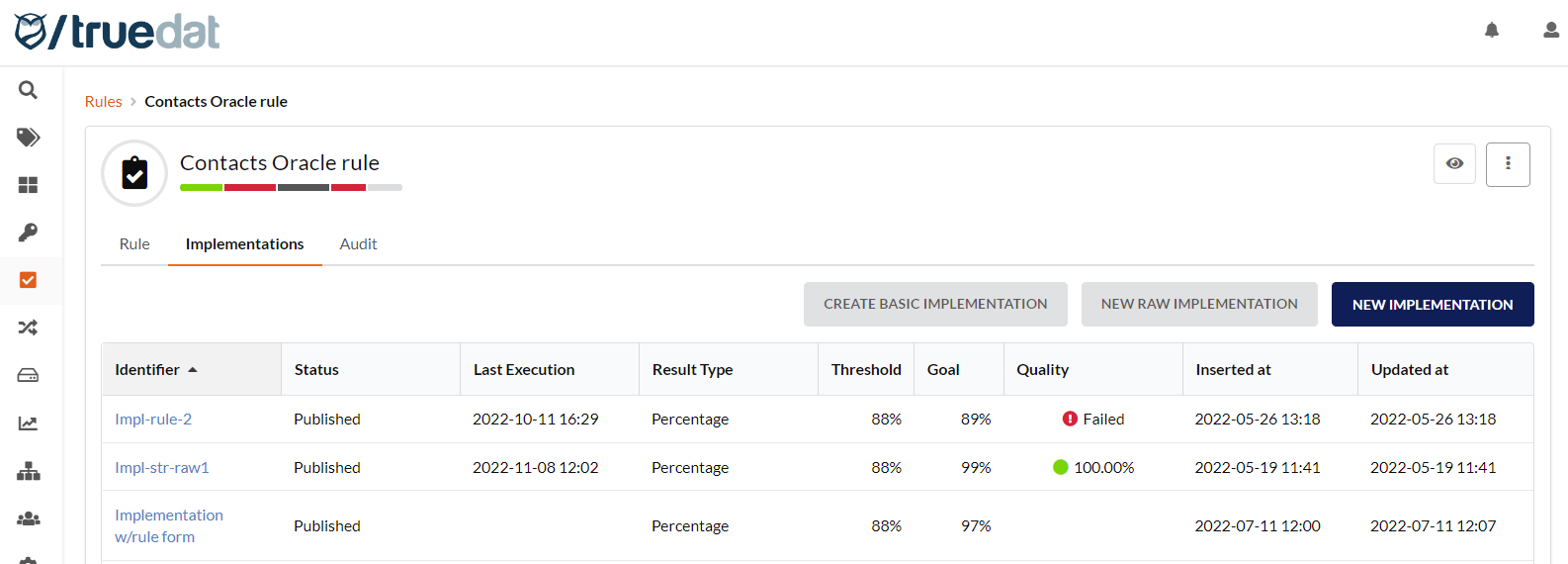
Create the implementation from the quality rule in the **Implementations** tab.

There are 3 types of implementations you can create:

1\) Form implementation: Clicking **New Implementation** on the right-hand side of the screen opens a multi-step form that guides you through the creation process.

2\) Raw or native implementation: If you want to set up a more complex implementation, click **New Raw Implementation**.

3\) Basic implementation: Click **Create basic implementation** to register implementations with only the basic information (`id`, result type, threshold, and goal), without entering additional information related to the dataset or validation.

<figure><img src="/files/FiZWMMNSHLyiHQrmbx6c" alt=""><figcaption></figcaption></figure>

**Option 2: Standalone Implementation**

There are two ways to create implementations when they are not linked to a quality rule:

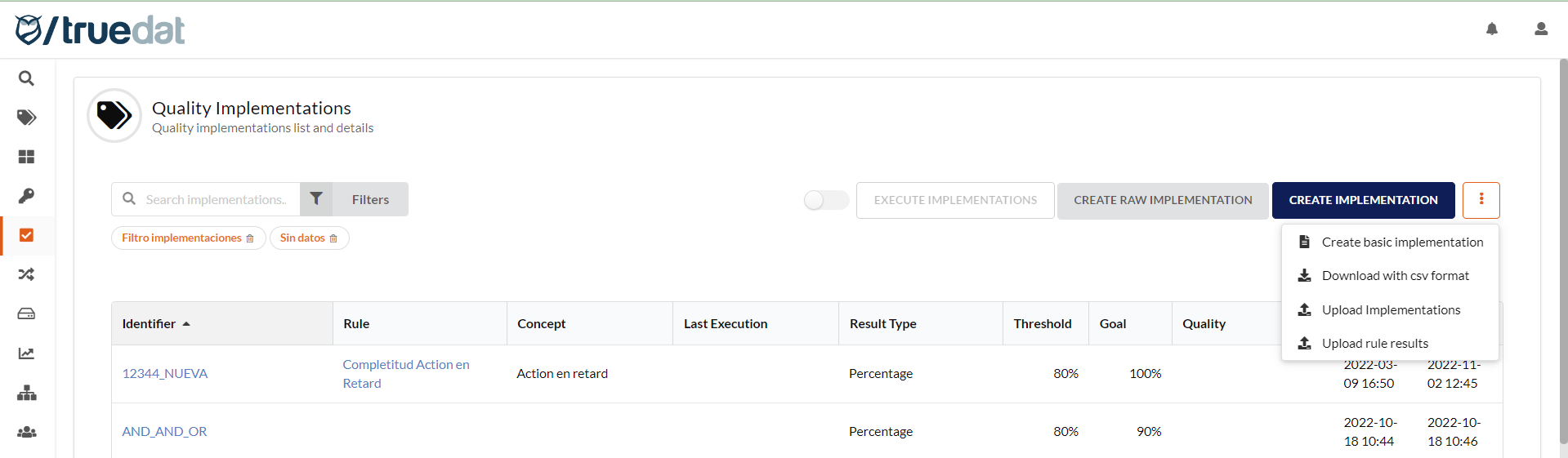
1\) From the list of implementations in the Data Quality module.

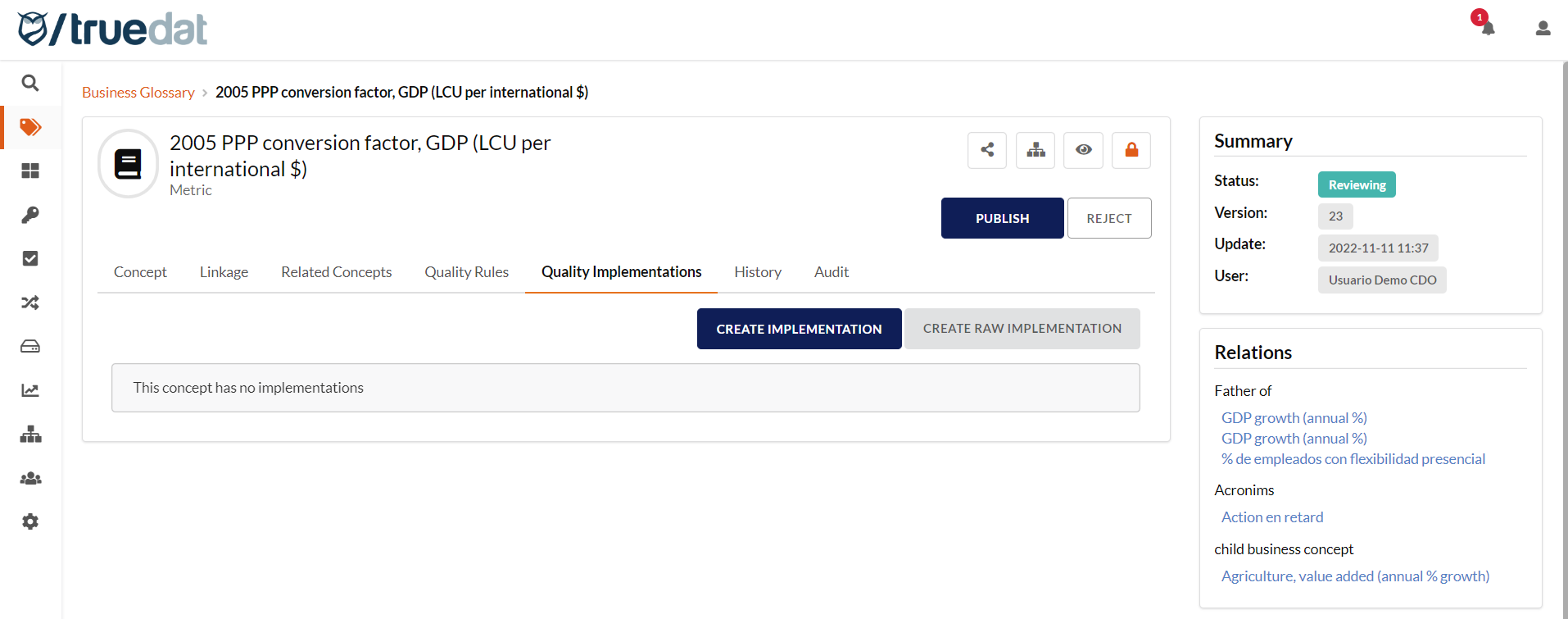
2\) From a concept in the Business Glossary module, if you want the implementation to be linked to a business concept.

There are 3 types of implementations you can create:

1\) Form implementation: Clicking **New Implementation** on the right-hand side of the screen opens a multi-step form that guides you through the creation process.

2\) Raw or native implementation: If you want to set up a more complex implementation, click **New Raw Implementation**.

3\) Basic implementation: You can also register implementations with only the basic information (`id`, result type, threshold, and goal), without entering additional information about the dataset or validation. To create this type of implementation, click the three-dot menu button and select **Create basic implementation**.

<figure><img src="/files/z8D5poX9PQHLUQmwlxA6" alt=""><figcaption><p>Option 1: From the Data Quality module</p></figcaption></figure>

<figure><img src="/files/PEhR3tla95f0evSLFSVx" alt=""><figcaption><p>Option 2: From the Business Glossary module</p></figcaption></figure>

### New implementation using multi-step form

Create the implementation by completing the following four sections:

#### Information

Enter the information associated with the quality implementation. You can provide:

* **Executable:** By default, all implementations can be executed by Truedat connectors. If you do not want a specific implementation to be executed by Truedat's quality engine, clear this option. This is useful if you have integrated an external quality engine and do not want Truedat to execute something that is already handled by a third party.
* **Implementation key**: Defines a unique identifier. You cannot use an existing identifier. If you do not enter a value, an identifier will be generated automatically.
* **Result type:** Defines whether this quality rule measures compliance based on a quality percentage, deviation, or an absolute number of errors.
  * Quality percentage: The measure is the percentage of records that match the quality criteria. Values range from 0% to 100%, where 100% represents the highest data quality.
  * Deviation: Used to compare two counts or amounts that should be similar. It gives the percentage difference between the data being checked and the reference data. Values range from 0% to 100%, where 0% represents the highest data quality.
  * Errors number: Used to check the absolute number of errors in your data, regardless of data volume. This is useful for large volumes of records with a small margin of error. Values are positive integers, where 0 errors represents the best possible quality.
* **Threshold value:** Minimum value resulting from the execution of the rule. Below this value, a quality error is considered to have occurred.
* **Goal value:** Target value for the rule. Between the threshold value and the goal value, a quality alarm is considered to occur.
* **Dynamic information:** Fill in the information defined by your [Quality Implementation template](/v8.7/administration/templates.md), if one has been defined.

![](/files/NrGbbCvAn1Ikco10W4MU)

#### **Data set**

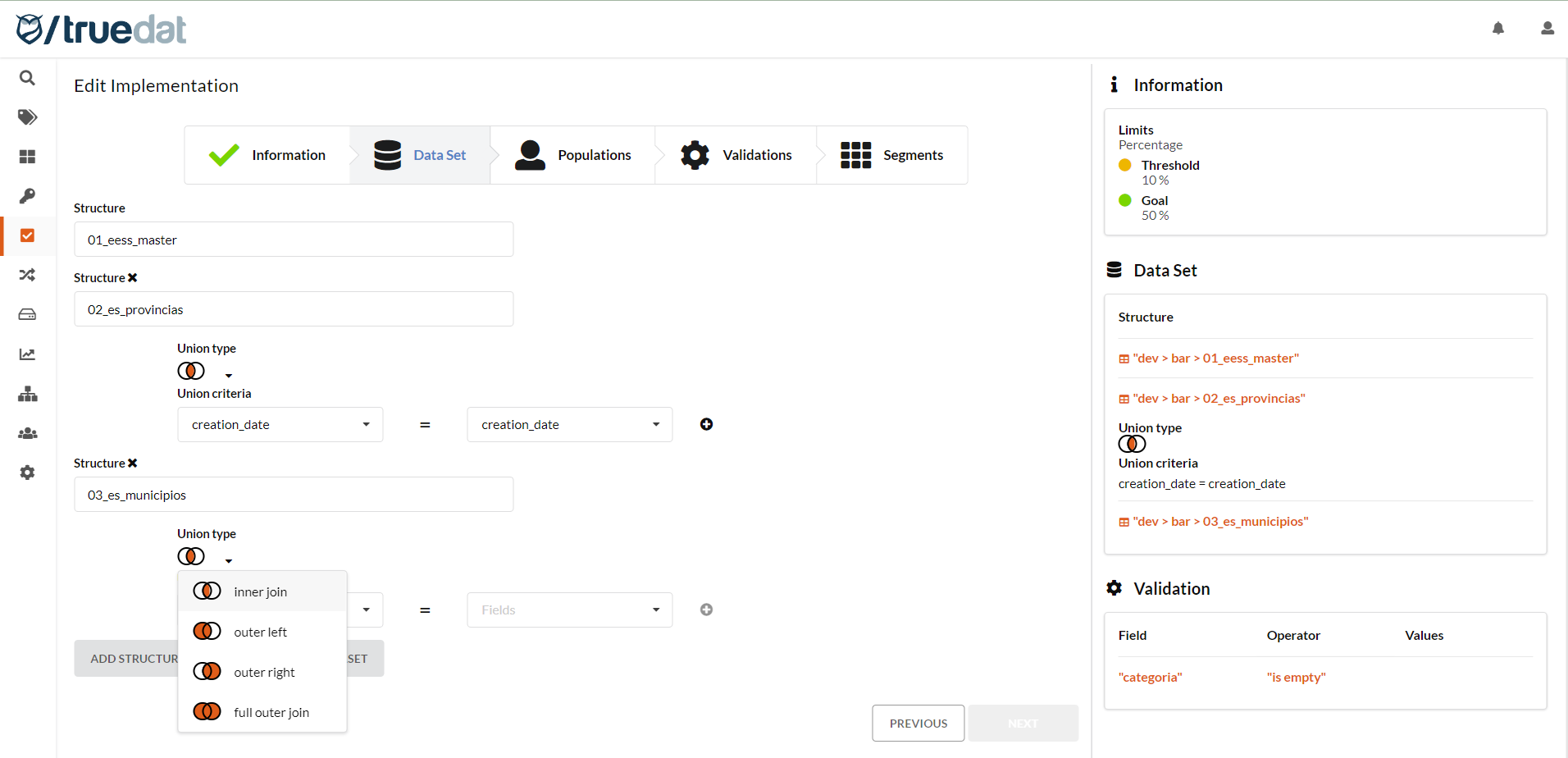
This is the data set on which quality will be measured. To define it, you must select one or more structures from the data catalog. You can also use a [reference data table](/v8.7/administration/data-catalog-management.md#reference-data-management) if you have set one up in Truedat.

You can join information from several tables and even join a table to itself. To do this, select the join type (`inner join`, `left outer join`, `right outer join`, or `full outer join`) and the fields from both structures that must be used to make the join.

<figure><img src="/files/8NxOY4s0YzOtFBa5R5qU" alt=""><figcaption></figcaption></figure>

#### **Population**

The validation can be applied to the whole data set defined in the previous step, or to only a subset of that data set. To do this, apply filters to define the population to which the validation applies. You can define more than one population in the same dataset.

![](/files/57F9vJlmBb9i538e2ilY)

#### **Validation**

Using the available operators, define the conditions to apply to the validation. You must define at least one validation. You can include both AND and OR conditions. Clicking <img src="/files/kbige0rcHkTaLu5OCpGN" alt="" data-size="line"> creates an AND condition, and clicking <img src="/files/xcF5RtPgaIW7RACl56Yk" alt="" data-size="line"> creates an OR condition.
The result returned when this implementation is executed is determined by the number of records that meet the validations defined here.
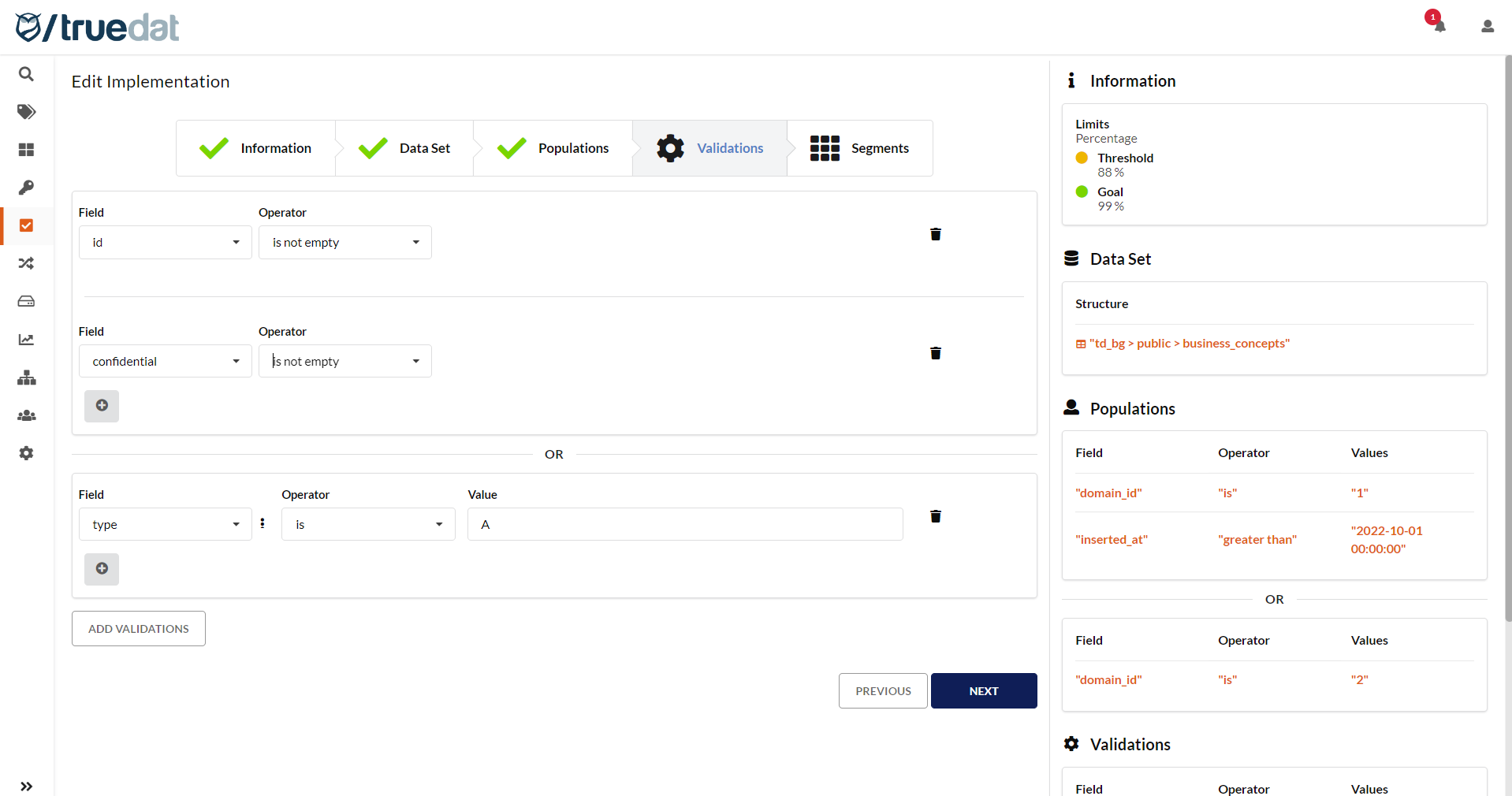
<figure><img src="/files/D6BkHAVXyELNpGOi1NSQ" alt=""><figcaption><p>Validations screen</p></figcaption></figure>

#### **Operators** <a href="#id-1.4dataquality-operators" id="id-1.4dataquality-operators"></a>

Both the population step and the validation step use operators defined in the application. The product includes some default operators, but the operators used in each installation can be customized. It is important to note that any change to the operators implies changes in the quality engine if it is integrated into your installation.

An operator is always applied to a field in the selected data set and may, depending on the operator, require additional parameters.

Operators have the following characteristics:

* **Data types:** The data type is displayed when selecting a field in both the population step and the validation step. Depending on the selected type, different operators are available. Examples:<br>
  * Number: For a numeric data type, you will have operators such as greater than, less than, or equal to.
  * Text: For a text field, you will have operators that compare the length of the text.
  * Date: For a date field, you will have an operator that lets you check whether it is the last day of the month.
* **Scope**: Some operators are available in both the population step and the validation step, while others only make sense in one of them. For example, the operator that checks the format of data is available in validation, but not in the population filter.
* **Groupings:** To make operator selection easier, some operators are shown in groups.
* **Parameters:** Depending on the operator, a series of parameters may be required. These may be values entered by the user or other fields from the selected data set. Examples:<br>
  * No parameters: The **Is empty** operator does not need parameters.
  * One parameter: The **Is greater than** operator requires the user to enter the minimum value to check.
  * Two parameters: The **Between** operator requires the user to enter the minimum and maximum values to check.
  * Value from a list: The **Has a format of** operator shows a drop-down list with the available formats to check, such as date, number, or DNI.
  * Another field from the selected data set: The **Equals field** operator requires the user to select a field from the data set. A drop-down list is displayed so you can search for and select the field.
  * Another field in the data catalog: The **Referenced in** operator lets you select any field in the data catalog to perform a referential integrity test.

#### Segmentation

In this step, you can define drill-down criteria so quality results are presented not only as a total, but also by the defined segmentation. This step is optional and is available only to users with the **Manage Implementation Segments** permission.

![](/files/hwGOUpi4X87GxvtwymDe)

Once these steps are completed, the implementation is created. If you have permission to publish implementations, you can save the implementation in **Draft** status or directly in **Published** status.

For this implementation to be executed automatically, your installation must be integrated with a quality engine for the system where you want to run it.

### Native implementations <a href="#id-1.4dataquality-nativeimplementations" id="id-1.4dataquality-nativeimplementations"></a>

Native implementations can also be registered. The person creating the implementation must know the system where it will be executed in order to use the correct syntax for the target system. In this type of implementation, the following values must be filled in:

* **Implementation Key**: Defines a unique identifier. You cannot use an existing identifier. Identifiers do not allow spaces or restricted characters. If you do not enter a value, an identifier will be generated automatically.
* **Dynamic Information**: As defined by your implementation template, if one exists.
* **Data Source**: The source on which the validation will be executed.
* **Database**: In case the data source requires a database to be selected.
* **Dataset:** Defines the data set on which you want to perform the validation. In an SQL statement, this field would include the `FROM` section of the query, where joins and aliases for tables can be entered.
* **Population:** Defines the filter applied to the data from the previous point. This is used to define a subset of the data on which you want to perform the validation. In an SQL system, this field must contain valid syntax for the `WHERE` clause of a query.
* **Validation**: Enter the validation you want to perform on the data selected in the data field and filtered in the population field. In an SQL system, this field must contain valid syntax for the `WHERE` clause of a query.

![](/files/-MaSf_JqLB_xc3bxY3rd)

### Bulk upload of implementations <a href="#id-1.4dataquality-nativeimplementations" id="id-1.4dataquality-nativeimplementations"></a>

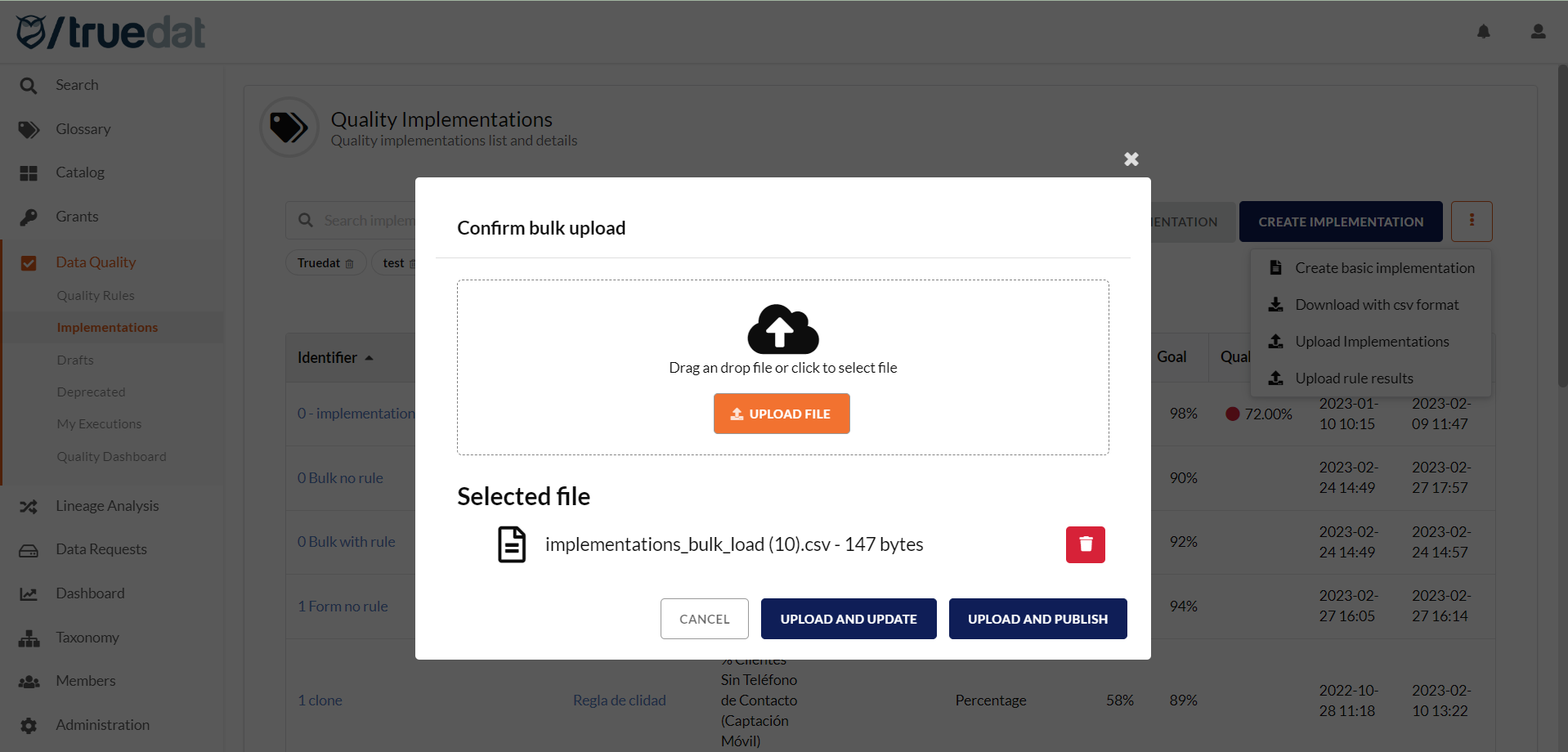
You can bulk upload implementations from an Excel file, but only for the **Information** fields. The file format depends on the template defined in your installation. To upload this information, go to the Implementations screen and, in the three-dot menu, select **Upload implementations**.

![](/files/Zfpsf2L0IvoVcOsl8LGp)

<figure><img src="/files/JIbNQfFp1Tf8QSUJ8CaI" alt=""><figcaption></figcaption></figure>

If you have permission to publish implementations, you can choose to upload them in draft status or directly in published status.

File format:

* `implementation_key` (optional): Only required to update existing implementations. Leave it blank to create new ones.
* `domain_external_id`: External ID of the implementation.
* `result_type`: This can be `percentage`, `errors_number`, or `deviation`.
* `minimum`: Threshold value.
* `goal`: Goal value.
* `template`: Name of the template.
* Template fields: Use the field name, not the label.

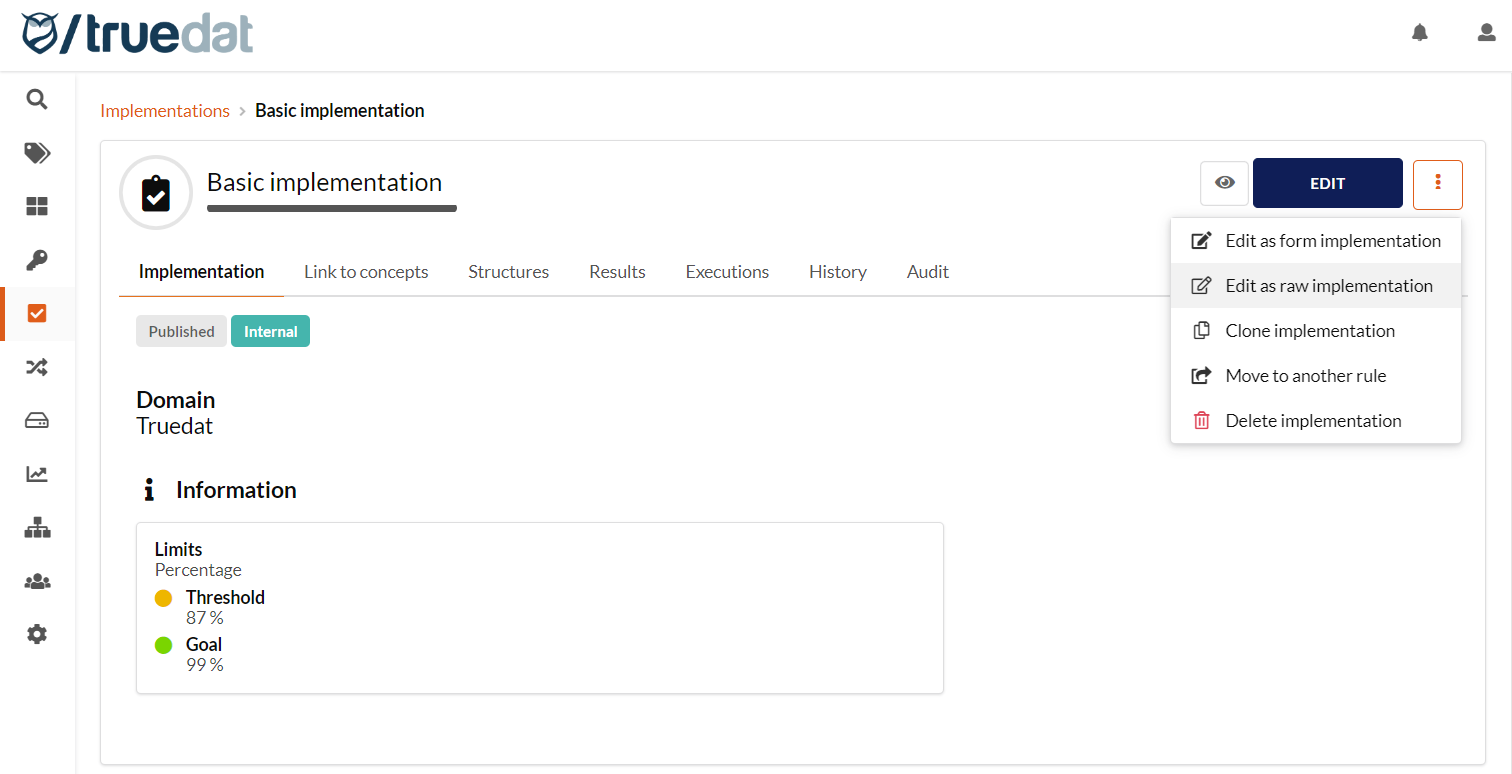
The implementations loaded this way are basic implementations with only the basic information. You can edit them later to complete the information related to **Data Set**, **Population** (optional), **Validation**, and **Segmentation** (optional). You can add this information by completing the multi-step form or the raw implementation form, using the relevant option: **Edit as form implementation** or **Edit as a raw implementation**.

### Linking implementations to business concepts <a href="#id-1.4dataquality-modifyingimplementations" id="id-1.4dataquality-modifyingimplementations"></a>

Quality implementations can be linked to business concepts in the **Link to concepts** tab. You can define different [types of relationships](/v8.7/administration/relations.md) in the Admin module.

![](/files/r5yV2oMLyrSvQABZsJ9r)

### Linking implementations to structures

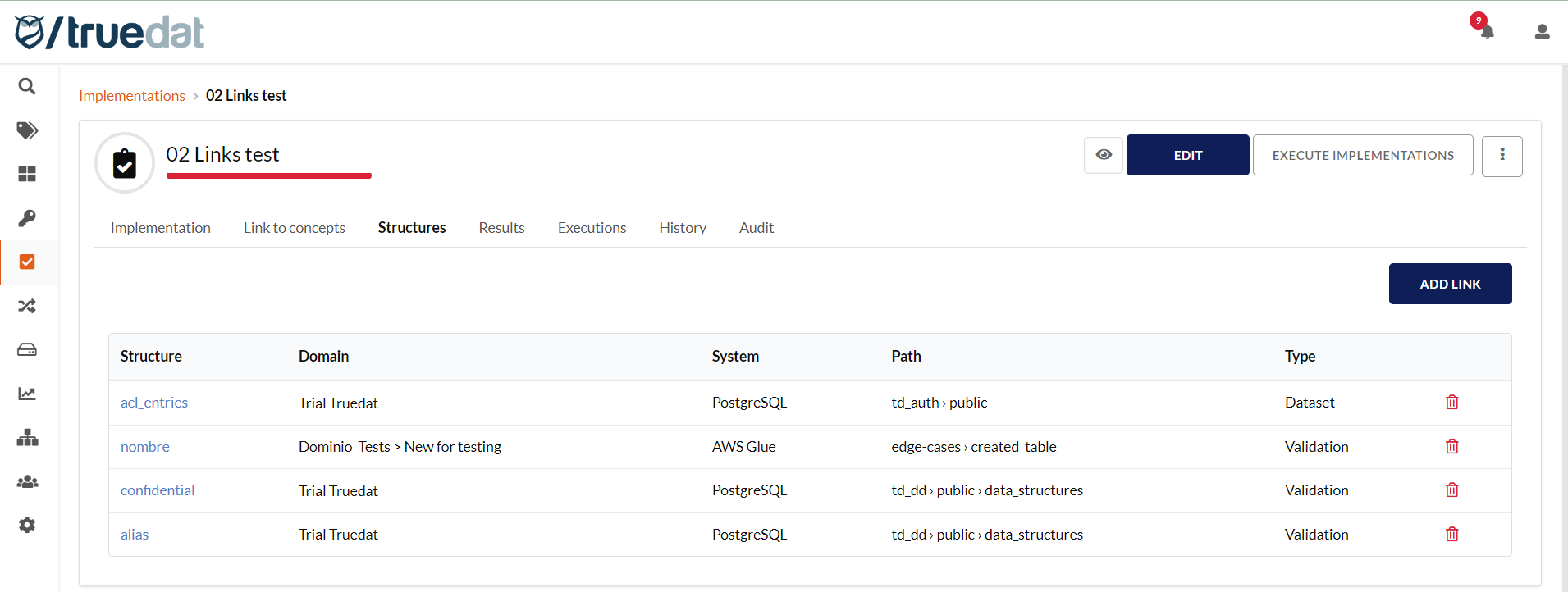
Quality implementations are automatically linked to the data structures used in the dataset and validations, and they are displayed in the **Structures** tab. You can delete or add links if the ones proposed automatically by the tool are not correct or relevant. This can happen with raw implementations, where the tool extracts the information from the SQL code and may not be accurate.

<figure><img src="/files/fODGPhb0PVJH9buDKRm8" alt=""><figcaption></figcaption></figure>

### Modifying implementations <a href="#id-1.4dataquality-modifyingimplementations" id="id-1.4dataquality-modifyingimplementations"></a>

If you edit a published implementation, a new version of the implementation will be created. This new version may go through the approval workflow, if required.

Basic implementations can be edited to include information about the dataset, population, and validation. To do this, you can edit them as a form implementation, which takes you through the multi-step form, or edit them as a native implementation. From the implementation details page, click the three-dot menu button and select the corresponding option.

<figure><img src="/files/JynzwUMALDTkSgeORnKs" alt=""><figcaption></figcaption></figure>

You can also upload a file to update implementations, but only the general information such as result type, goal, threshold, and any field from the custom template. Information related to the dataset, population, validation, or segmentation cannot be updated this way.

### Create duplicates of existing quality implementations <a href="#id-1.4dataquality-cloningofdeployments" id="id-1.4dataquality-cloningofdeployments"></a>

You can clone existing quality implementations in a simple way:

* The new quality implementation inherits all parameters from the previous implementation except the implementation key, because a new key must be defined for the cloned implementation.
* The new implementation is linked to the same rule as the implementation it was cloned from.
* The concepts linked to the implementation are also copied to the cloned implementation.

![](/files/-MaSfnPF4rP7hsyo0xnk)

### Implementations deactivation and deletion

You can deactivate your quality implementations. This prevents them from being executed through the scheduled process while keeping the information available for dashboards. To do this, edit the implementation and turn off the **Executable** slider.

![](/files/jHa6UmVeVZZcBHFbinpa)

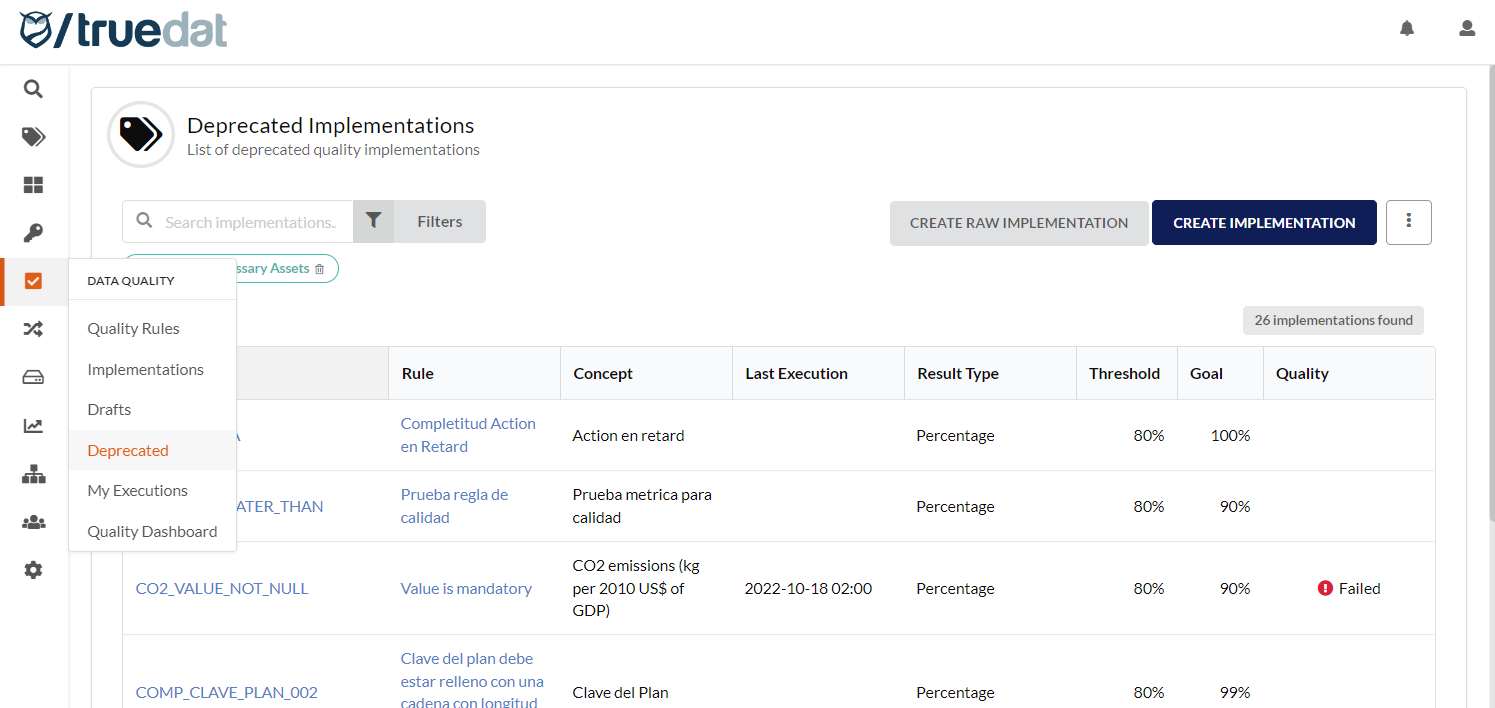
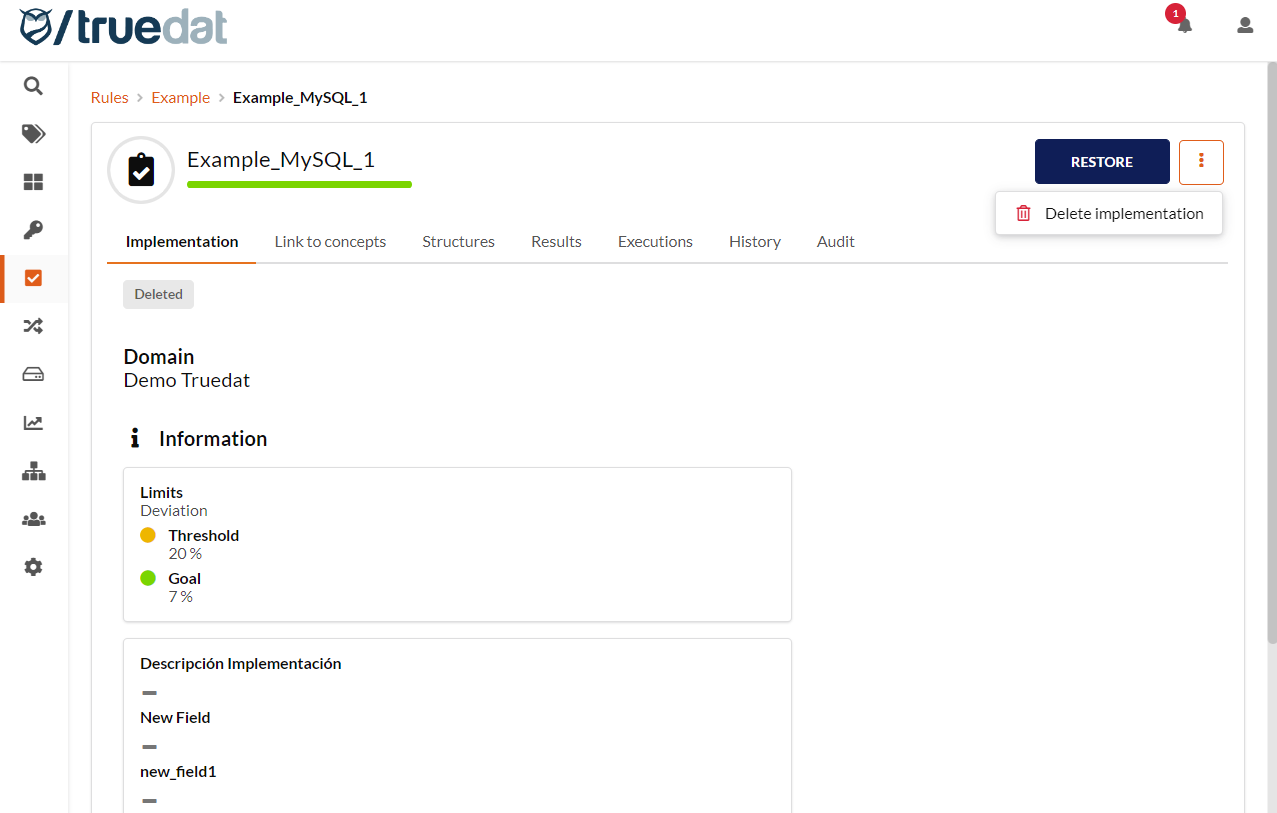
If you no longer need an implementation, it can be deleted if you have the **Review Implementations** permission. Click the button on the right-hand side and select **Delete implementation**. The implementation will then be marked as **Deprecated**.

![](/files/dOVIbhQL3GBfxbdJUkIA)

All deprecated implementations can be accessed from the **DATA QUALITY** menu under the **Deprecated** submenu. From this list, you can view deprecated implementations, restore them to **Published** status, or permanently delete them.

<figure><img src="/files/LOj0H5gAXl2P5avewz9H" alt=""><figcaption></figcaption></figure>

<figure><img src="/files/xjJUb9Pc4aQpYKVgxddF" alt=""><figcaption></figcaption></figure>

## **Execution of quality implementations** <a href="#id-1.4dataquality-executionofqualityrules" id="id-1.4dataquality-executionofqualityrules"></a>

Users with the required permissions can request the execution of quality implementations. To run these implementations, the data source must be correctly set up with data access.

There are two ways to execute implementations:

1\) From the implementations screen, use the slider next to **Execute Implementations** to enable execution requests. Once it is activated, select the implementations to run and click the execute button.

![](/files/4WWSRctCEVdYtO8f4wnx)

2\) From an implementation's details screen, if you want to execute only a specific implementation.

![](/files/YcUJ6K1IgKtUh0k7lmdR)

Once the execution has been requested, you are redirected to a screen where you can monitor the execution progress. Refresh the screen to see the current status.

![](/files/-MSSg3FlaV0xskYpxZYv)

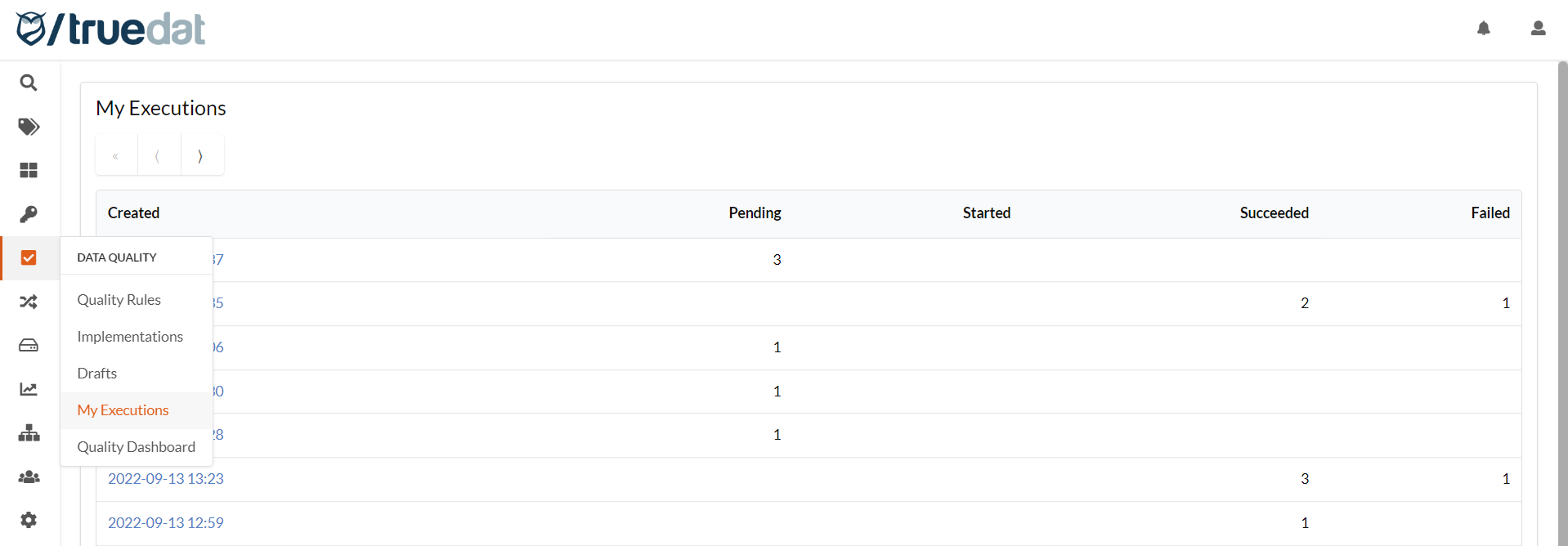
You can view a list of the last 50 executions you requested by going to **My Executions** under **DATA QUALITY**.

<figure><img src="/files/kFvx581lHX0ap3CD9Zfk" alt=""><figcaption></figcaption></figure>

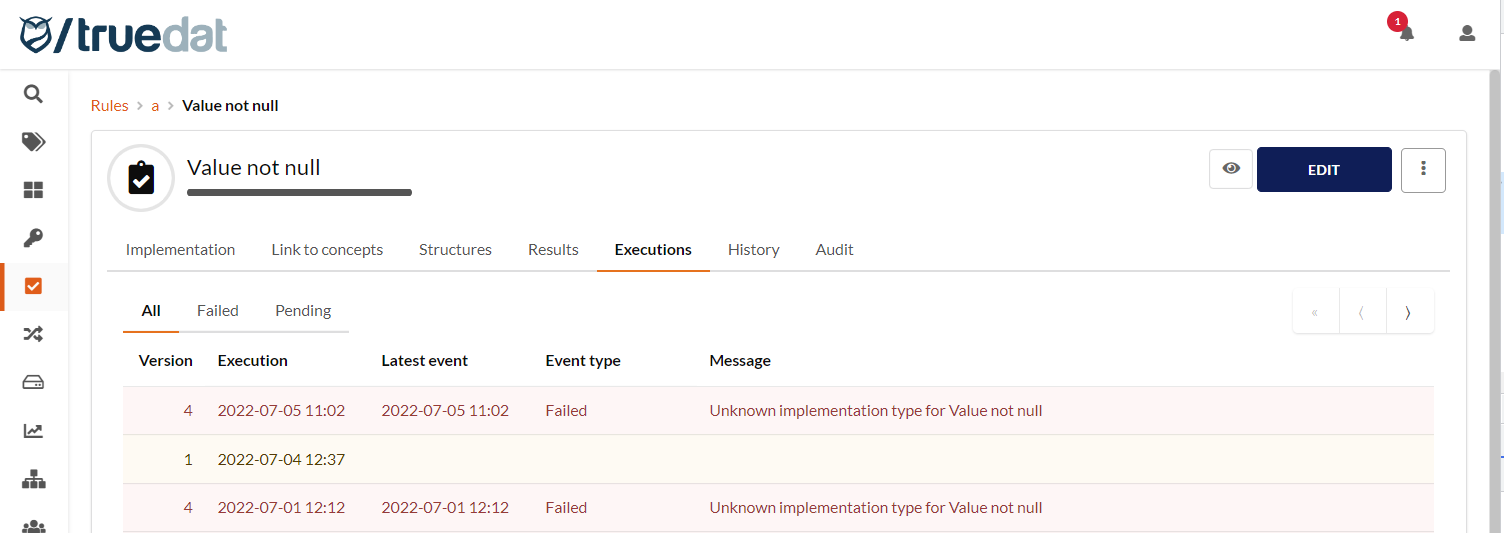
You can view a list of all executions for an implementation by opening the implementation and going to the **Executions** tab. You can filter the list to show failed and pending executions.

<figure><img src="/files/X4X5Qjv87ejlzn3Srkqo" alt=""><figcaption></figcaption></figure>

## **Quality implementation execution results** <a href="#id-1.4dataquality-qualityrunresults" id="id-1.4dataquality-qualityrunresults"></a>

The data quality module can receive and store quality execution results and display them on screen. When results are received, the result of each implementation linked to the rule is displayed.

In addition, clicking an implementation lets you see the history of all its executions.

![](/files/URbaboCzNSmTOlfH6CVb)

Click the execution date to see the details of that execution. The **Details** tab also shows information about the latest execution.

![](/files/8atxDhbHB6EcoKmQX75O)

If the implementation was defined with drill-down criteria, you can view results for each segment by clicking the icon <img src="/files/gLMxwwOORPW8FisOsaFa" alt="" data-size="line"> next to the result.

![](/files/KwTLxXBnQEFh8uvgUsX1)

![](/files/6INqcvK5GDdtRMYWNsIx)

Admin users can delete quality rule results. This should not happen often, but the option can help you remove erroneous uploads:

![](/files/-MKAunGw6zu_5bqx3d3q)

### **Quality execution errors**

If the latest execution for an implementation has finished with an error, this is displayed in both the implementations list and the implementation results tab so the user can identify the problem and fix it.

![List of implementations](/files/LGMbBilMLTWhHCxB1Tfg)

![Results screen of an implementation](/files/dYcbypfCYoHyf0VpzZRO)

## **Remediation plans** <a href="#id-1.4dataquality-qualityrunresults" id="id-1.4dataquality-qualityrunresults"></a>

Additional information, such as remediation plan details, can be recorded and linked to the result of an implementation execution. This additional information is managed by a type of template that must be defined beforehand by an admin user.

![](/files/5j7VbfyXzFZOxG7Ykxxe)

Only roles with the [permission](/v8.7/administration/userroles.md) **Manage Remediation Plans** can create, edit, or delete remediation plans.

![](/files/NGO2Ga67n2887dHoA5mt)

### **Create remediation plan**

In the detail view of an implementation execution result, you can create a remediation plan linked to that result. Click **Create remediation plan** and fill in the information defined in the template.

![](/files/YhaFVllNeTvtS0YDPx4S)

### **View remediation plan**

In the **Results** tab of an implementation, the icon ![](/files/8Oo5is7ybJmKqQ1yldtj) is shown for results that have a remediation plan.

![](/files/CG9l5fJIyPokq9lXzaWC)

Clicking the icon ![](/files/8Oo5is7ybJmKqQ1yldtj) takes you to the execution details and the remediation plan.

![](/files/KQyyVOl6s5dpnyDpWT5O)

### **Edit or delete remediation plan**

Remediation plans can be edited and deleted by clicking the relevant button in the **Remediation Plan** section. Only users with the appropriate permission can do this.

![](/files/r6RkSOVP9vPdrqaohx6Z)

## **Notifications** <a href="#id-1.4dataquality-notifications" id="id-1.4dataquality-notifications"></a>

Users can subscribe to quality rules and quality implementations by clicking the subscription icon <img src="/files/AVK4QXqx38tkXEaAjS0N" alt="" data-size="line"> and choosing which events to watch: result below threshold, result between threshold and goal, result above goal, or failed execution. If the selected event occurs for the chosen quality rule or implementation, the user receives a notification in the bell at the top right and is also notified by email.

![](/files/2ChFKfK09TlbCVL9T4Az)

**Notifications periodicity:**

* **Immediately**: The user receives the notification when the result is received in Truedat.
* **Hourly**: Every hour, the user receives an email with all results received in Truedat that match the configuration.
* **Daily**: The user receives a digest email with all results that match the selected criteria.

**Notify results**: The user selects which result types are sent.

* **Goal**: Results that are above the goal.
* **< Goal:** Results that are between the threshold and the goal.
* **< Threshold:** Results that are below the threshold.
* **Failed:** Cases where execution fails and no result is produced.