> For the complete documentation index, see [llms.txt](https://docs.truedat.io/llms.txt). Markdown versions of documentation pages are available by appending `.md` to page URLs; this page is available as [Markdown](https://docs.truedat.io/v6.7/release-notes/v5/v5.6.md).
# v5.6
Version released on 09/05/2023
## Release highlights
### 1. Data Market: **Access request to several structures**
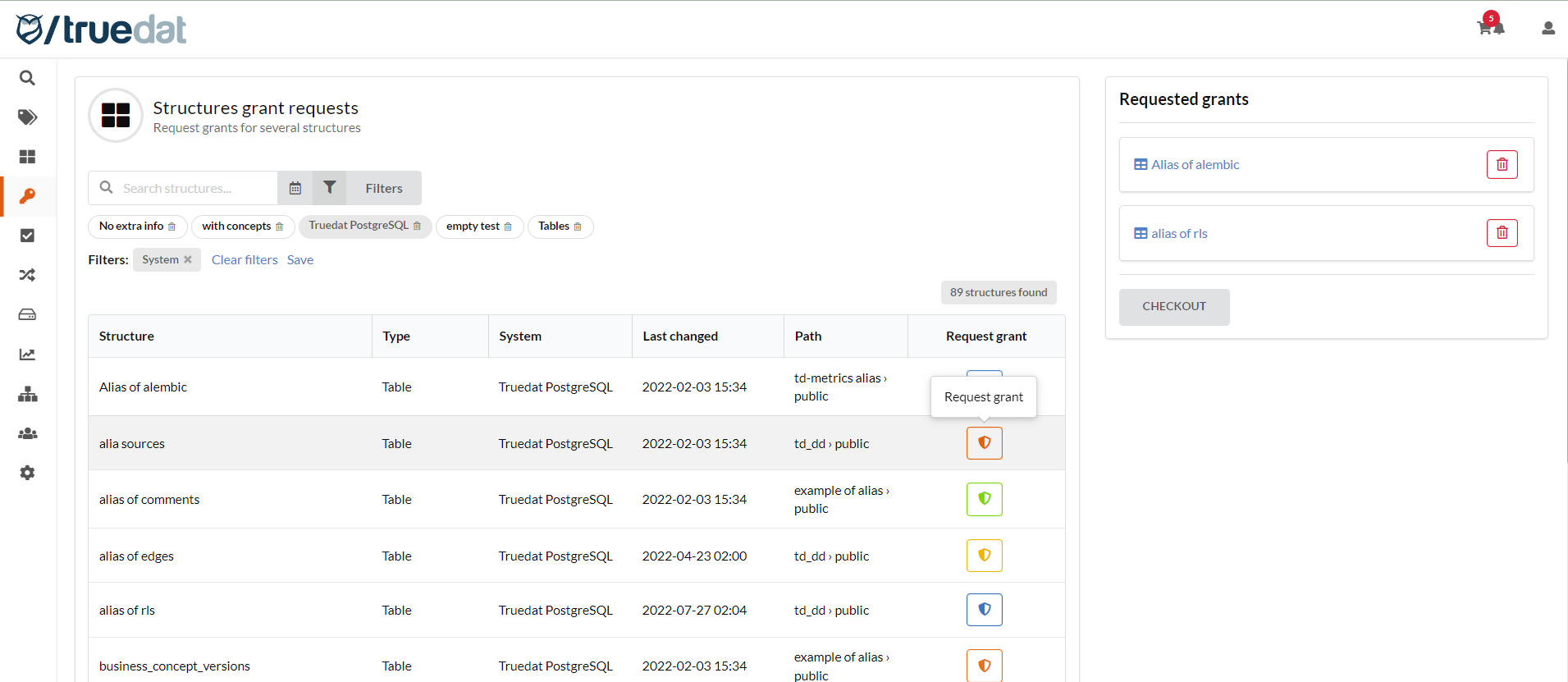
If you need to request access to several structures, you can now do it from a new screen 'Structures grant requests' in the Data Market module.
You will get a list of structures and clicking on the request button you will add it to your shopping cart. The orange icon means you can request access; green icon means you already have access to the structure; yellow icon means that there is already a request for that structure (either pending to be approved or already approved); blue icon means that the structure is in your shopping cart.
\
Features and fixes delivered with this release
----------------------------------------------
### Features
* TD-5661 As a user I want to request access to multiple structures selecting them from the same screen.
* TD-4217 As an administrator I want to have details of latest execution when downloading implementations, including sql statements.
* TD-3807 As a user I want to filter concepts, structures, quality rules, implementations and data requests by hierarchy fields.
* TD-5744 Data Catalog view displays only information for a maximum of 50 systems.
### Fixes
* TD-4243 Structure audit tab: Include structure notes events.
* TD-5442 Delete of implementations only deletes the latest version.
* TD-4591 Data Catalog navigation displays structures I don't have permission to view.
* TD-5680 Structures are not splitted by classes.
* TD-5732 When I edit an implementation to add a new dataset, if I later delete the link to a structure, in the Catalog the link in the Quality tab is still there.
* TD-5711 Process that retrieves events to send out notifications gives time out.
* TD-5602 Timeout in /api/executions/search end-point.